
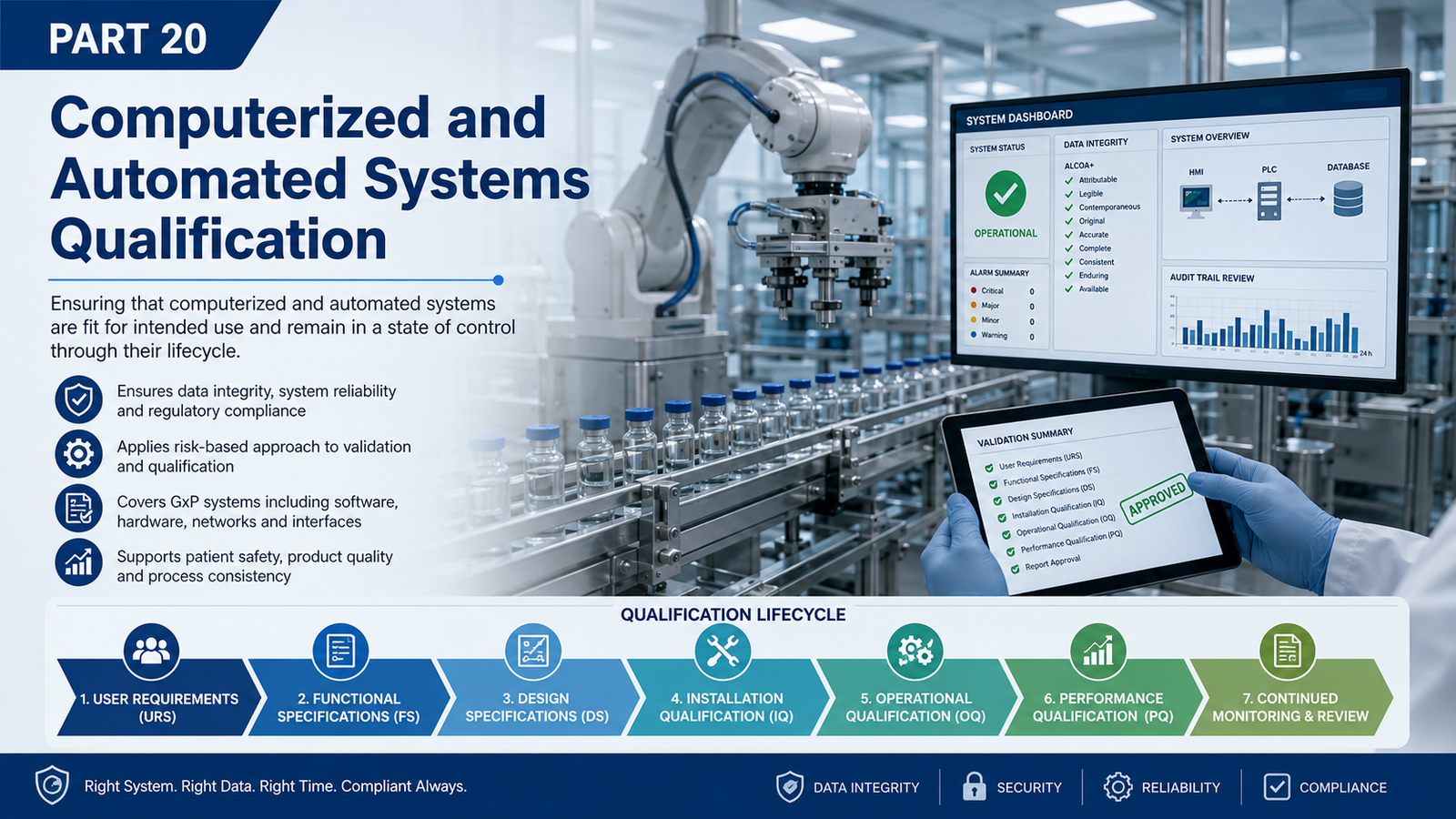
Modern pharmaceutical equipment increasingly depends on computerized and automated functions for process control, monitoring, alarms, recipes, electronic records, data acquisition, reporting, and decision-making.
Configuration → User Roles → Access Controls → Audit Trails → Electronic Records → Interfaces → Backup/Restore → Time Synchronization → Data Retention → Archiving → Security → Periodic Review
These controls should be evaluated according to applicability, intended use, GMP impact, and risk.
20.1 Purpose of Computerized and Automated System Qualification
The purpose is to establish documented evidence that computerized and automated functions used for GMP activities:
- are appropriately specified;
- are installed/configured as intended;
- perform their required functions;
- operate consistently within defined limits;
- appropriately control access;
- generate and maintain required records;
- preserve data throughout its lifecycle;
- maintain required interfaces;
- can be restored where applicable;
- remain controlled throughout operation and change.
The central question is:
Can the organization demonstrate that the computerized functions relied upon for GMP operation perform their intended functions consistently and remain under appropriate lifecycle control?
20.2 Computerized Systems Within Equipment Qualification
A pharmaceutical manufacturing system may contain several interconnected layers.
Enterprise / Business Systems
            ↓
MES / Manufacturing Systems
            ↓
SCADA / Historian
            ↓
HMI
            ↓
PLC / Controller
            ↓
Sensors / Instruments
            ↓
Actuators / Drives / Valves
            ↓
Physical Manufacturing Process
Qualification should understand the relevant system boundary and the GMP-critical functions performed at each applicable layer.
20.3 Examples of Computerized and Automated Systems
Depending on the facility, qualification may involve:
- PLC;
- HMI;
- SCADA;
- distributed control systems;
- equipment controllers;
- industrial PCs;
- recipe-management systems;
- data-acquisition systems;
- historians;
- electronic batch-related functions;
- automated utility controls;
- environmental-monitoring interfaces;
- laboratory/manufacturing interfaces.
Not every system requires identical qualification depth.
The qualification strategy should reflect:
Intended Use + GMP Impact + Complexity + Criticality + Risk
20.4 Computerized System vs Automation System
These terms often overlap but should be understood in context.
Computerized System
Includes software, hardware, configuration, data, procedures, users, and relevant infrastructure supporting a defined intended use.
Automated System
Uses control technology to automatically monitor or control equipment/process functions.
For example:
Temperature Sensor
      ↓
PLC
      ↓
Control Logic
      ↓
Control Valve
      ↓
Process Temperature
If this loop controls a critical manufacturing condition, qualification should address the complete functional chain—not merely the PLC hardware.
20.5 Qualification Starts With Intended Use
Before writing test scripts, clearly define:
What is the computerized system intended to do?
Examples:
- control equipment sequence;
- maintain process parameters;
- execute recipes;
- generate alarms;
- record process values;
- manage user access;
- generate electronic records;
- communicate with another system.
Without a clear intended use, meaningful risk assessment and qualification become difficult.
20.6 System Boundary
Define what is included and excluded.
Example:
┌────────────────────────────────────────────┐
│          Equipment Control System          │
│                                            │
│ Sensors → PLC → HMI → Local Data Storage  │
│             ↓                              │
│          Actuators                         │
└─────────────────────┬──────────────────────┘
                      │
                   Interface
                      ↓
                    SCADA
Document:
- hardware;
- software;
- network connections;
- instruments;
- interfaces;
- data flows;
- users;
- external systems.
20.7 System Architecture
A qualification package should contain or reference an appropriate system architecture.
Example:
                  ┌──────────────┐
                  │     MES      │
                  └──────┬───────┘
                         │
                    Interface
                         │
                  ┌──────▼───────┐
                  │    SCADA     │
                  └──────┬───────┘
                         │
                  ┌──────▼───────┐
                  │     HMI      │
                  └──────┬───────┘
                         │
                  ┌──────▼───────┐
                  │     PLC      │
                  └──────┬───────┘
                         │
              ┌──────────┼──────────┐
              ↓          ↓          ↓
           Sensors    Drives     Valves
The actual architecture should represent the installed system.
20.8 Lifecycle Approach
A practical computerized-system qualification lifecycle is:
Business / Process Need
        ↓
Intended Use
        ↓
URS
        ↓
GMP Impact Assessment
        ↓
Risk Assessment
        ↓
Functional / Design Specification
        ↓
Supplier Assessment
        ↓
Configuration / Development
        ↓
FAT
        ↓
Installation / SAT
        ↓
IQ
        ↓
OQ
        ↓
PQ / Process Verification
        ↓
Release
        ↓
Routine Operation
        ↓
Change Control
        ↓
Periodic Review
        ↓
Retirement
The exact documents and stages should be proportionate to system type and risk.
20.9 User Requirements Specification
The URS should define what the computerized or automated system is required to do.
Typical requirement areas may include:
Functional Requirements
- sequence control;
- process parameter control;
- recipes;
- alarms;
- interlocks;
- calculations;
- reports.
Security Requirements
- user identification;
- role-based access;
- password controls where applicable;
- administrative privileges.
Data Requirements
- electronic records;
- audit trails;
- retention;
- backup;
- restore;
- archiving.
Interface Requirements
- PLC–HMI;
- HMI–SCADA;
- SCADA–MES;
- instrument–PLC;
- other applicable systems.
20.10 Good URS Requirements
Weak:
System should have security.
Better:
The system shall restrict defined configuration functions to authorized user roles.
Weak:
System should have audit trail.
Better:
Where required for the intended GMP use, the system shall generate an audit trail for defined GMP-relevant changes with appropriate event information.
Requirements should be:
- clear;
- testable;
- traceable;
- unambiguous.
20.11 Risk Assessment
Risk assessment should determine:
Which computerized functions require verification, how extensively they require testing, and what evidence can appropriately support the qualification conclusion?
Consider potential impact on:
- product quality;
- process control;
- patient safety;
- GMP decisions;
- electronic records;
- data integrity;
- critical alarms;
- critical calculations;
- recipes;
- interfaces.
20.12 Computerized-System Risk Model
System Function
      ↓
Potential Failure
      ↓
GMP Consequence
      ↓
Existing Controls
      ↓
Risk
      ↓
Required Verification
Example:
PLC fails to activate high-temperature interlock.
Potential consequence:
Process continues outside intended condition.
Therefore, the function may warrant direct challenge testing.
20.13 Function Criticality
Functions may be assessed based on GMP impact.
Examples of potentially significant functions include:
- CPP control;
- critical alarm;
- interlock;
- recipe execution;
- automatic reject;
- GMP calculation;
- electronic record generation;
- user authorization;
- audit trail;
- data transfer.
Actual criticality should be documented through the approved risk methodology.
20.14 Configuration Management
Configuration is fundamental to computerized-system qualification.
Configuration may include:
- PLC program;
- HMI application;
- SCADA configuration;
- recipes;
- alarm limits;
- setpoints;
- user roles;
- network settings;
- report configuration;
- data-retention settings;
- interfaces.
Qualification should establish:
What configuration was tested and approved?
20.15 Configuration Baseline
A controlled baseline may record:
| Item | Identification |
|---|---|
| PLC software | Version ___ |
| PLC program | Revision ___ |
| HMI application | Version ___ |
| SCADA | Version ___ |
| Firmware | Version ___ |
| Recipe configuration | Revision ___ |
| Alarm configuration | Revision ___ |
| User-role configuration | Revision ___ |
The level of detail should reflect the system architecture and risk.
20.16 Why Configuration Matters
Consider:
OQ Testing
   ↓
PLC Program V1.2
   ↓
PASS
Later:
Current PLC Program
   ↓
V1.8
The organization must be able to establish:
What changed between V1.2 and V1.8, how was it controlled, and what evidence supports the current version?
This connects computerized-system qualification directly with change control and periodic review.
20.17 PLC Qualification
PLC qualification may involve:
- hardware identification;
- CPU/model;
- modules;
- firmware;
- I/O;
- program identification;
- communication;
- power supply;
- control logic;
- alarms;
- interlocks;
- sequences;
- calculations;
- failure responses.
The exact scope should reflect the PLC’s GMP functions.
20.18 PLC Hardware Verification
Potential IQ checks include:
- PLC manufacturer;
- model;
- CPU;
- I/O modules;
- communication modules;
- power supply;
- panel installation;
- wiring;
- grounding;
- network connection;
- environmental requirements.
The goal is to verify that installed hardware corresponds to approved design/configuration.
20.19 PLC Input/Output Verification
A critical control chain may be:
Field Sensor
    ↓
Input Module
    ↓
PLC Logic
    ↓
Output Module
    ↓
Actuator
    ↓
Physical Response
Qualification may need to verify the relevant end-to-end loop rather than only individual components.
20.20 PLC Logic Challenge
OQ should challenge applicable logic.
Examples:
- start permissives;
- stop conditions;
- sequence logic;
- alarm logic;
- interlock logic;
- calculations;
- reject logic;
- parameter limits;
- abnormal-condition responses.
Testing should demonstrate actual behavior against approved requirements.
20.21 HMI Qualification
An HMI may provide:
- process visualization;
- parameter entry;
- recipe selection;
- alarm display;
- user login;
- trends;
- equipment commands;
- status indication.
Qualification should focus on the GMP functions actually performed through the HMI.
20.22 HMI Functional Testing
Potential tests include:
- screen navigation;
- correct parameter display;
- correct engineering units;
- parameter-entry restrictions;
- operating limits;
- user-role restrictions;
- alarm indication;
- equipment status;
- recipe display;
- command execution.
Do not treat every graphical element as equally critical.
20.23 SCADA Qualification
SCADA may perform:
- supervisory monitoring;
- data acquisition;
- trending;
- alarm management;
- electronic-record generation;
- reporting;
- interface functions;
- historical data storage.
Qualification should assess applicable GMP functions based on intended use and risk.
20.24 SCADA Data Flow
Example:
Process Sensor
      ↓
PLC
      ↓
SCADA
      ↓
Historian / Database
      ↓
Trend / Report
      ↓
GMP Review
If a GMP decision relies on the final report, qualification should consider the integrity of the relevant data path.
20.25 User Roles
The master framework specifically requires user roles to be considered.
Typical roles may include:
- Operator;
- Supervisor;
- Engineer;
- Administrator;
- Maintenance;
- QA reviewer.
Role names vary by system.
The important question is:
Does each role have access appropriate to its authorized responsibilities?
20.26 Role-Based Access Control
A practical matrix:
| Function | Operator | Supervisor | Engineer | Administrator |
|---|---|---|---|---|
| Start equipment | ✓ | ✓ | ✓ | As designed |
| Change routine parameter | Limited | ✓ | ✓ | As designed |
| Change critical configuration | ✗ | ✗/Limited | ✓ | ✓ |
| Create user | ✗ | ✗ | ✗ | ✓ |
| Change system configuration | ✗ | ✗ | Limited | ✓ |
This is illustrative. Actual privileges must follow approved requirements.
20.27 Access-Control Testing
Test applicable functions such as:
- valid login;
- invalid login;
- unique user access;
- role restrictions;
- unauthorized-function prevention;
- password controls;
- session controls;
- administrator functions.
Testing should focus on controls relevant to the system’s intended GMP use.
20.28 Shared Accounts
Where accountability for GMP activities depends on user identification, shared credentials can undermine attribution.
The qualification/risk assessment should therefore determine whether:
- actions must be attributable to individuals;
- unique accounts are required;
- technical controls support the intended access model.
Operational procedures should align with the qualified access configuration.
20.29 Administrator Access
Administrator privileges may permit:
- user creation;
- role changes;
- configuration changes;
- application changes;
- system-level settings.
Because of this power, administrative access should be appropriately controlled according to system risk and intended use.
Qualification may verify:
Only appropriately authorized roles can perform defined administrative functions.
20.30 Audit Trails
Where applicable to the intended GMP use, audit-trail functionality may need qualification.
Potential information includes:
- user;
- date/time;
- action;
- affected record/parameter;
- previous/new values where supported and required;
- event information.
The exact content depends on the system’s functionality and requirements.
20.31 Audit-Trail Testing
Potential challenge:
Authorized User Login
        ↓
Change GMP-Relevant Parameter
        ↓
Save / Confirm Change
        ↓
Open Audit Trail
        ↓
Verify Event Recorded
        ↓
Verify User Attribution
        ↓
Verify Date/Time
        ↓
Verify Relevant Change Information
Test against the approved requirement rather than assuming every system provides identical audit-trail functionality.
20.32 Audit-Trail Negative Testing
Where applicable, test whether:
- unauthorized users can alter audit-trail configuration;
- audit-trail records can be improperly modified;
- relevant events are omitted;
- system behavior following storage limitations is appropriately controlled.
Negative testing is particularly useful for high-risk controls.
20.33 Electronic Records
Where the system creates GMP electronic records, qualification should establish which records are relied upon.
Examples:
- process parameter history;
- alarm records;
- batch-related records;
- electronic reports;
- recipe records;
- user/access records;
- audit-trail records.
The qualification scope should follow the actual record lifecycle.
20.34 Electronic Record Lifecycle
Record Creation
      ↓
Processing
      ↓
Storage
      ↓
Review / Use
      ↓
Retention
      ↓
Retrieval
      ↓
Archiving
      ↓
Final Disposition
Controls should be evaluated where applicable across this lifecycle.
20.35 Electronic Record Verification
Potential tests include:
- record generation;
- correct value;
- correct date/time;
- attribution;
- completeness;
- storage;
- retrieval;
- readability;
- report accuracy;
- retention;
- backup/restore.
The required depth depends on intended use and risk.
20.36 Data Integrity
Computerized-system qualification should support the integrity of GMP data throughout the relevant lifecycle.
A useful data-flow question is:
Can the organization demonstrate where GMP data originate, how they are transferred, where they are stored, how they are protected, and how they are retrieved?
This requires understanding more than the visible HMI screen.
20.37 Data Flow Mapping
Example:
Load Cell
   ↓
PLC Input
   ↓
PLC Calculation
   ↓
HMI Display
   ↓
SCADA Transfer
   ↓
Database
   ↓
Report
Potential failure points include:
- wrong scaling;
- wrong calculation;
- communication failure;
- incorrect mapping;
- database error;
- incorrect report calculation.
Risk assessment should identify which points require verification.
20.38 Interfaces
The master framework specifically requires interfaces to be considered.
Examples:
- PLC ↔ HMI;
- PLC ↔ SCADA;
- SCADA ↔ Historian;
- SCADA ↔ MES;
- equipment ↔ MES;
- analyzer ↔ control system.
Interfaces can create significant data-integrity and operational risks.
20.39 Interface Qualification
Test applicable scenarios:
Correct Transfer
Does the source value arrive correctly?
Data Mapping
Does the destination field correspond to the correct source?
Units
Are engineering units preserved?
Communication Failure
What happens when the interface fails?
Recovery
Does communication recover appropriately?
Duplicate/Lost Records
Could records be duplicated or lost?
Time
Are timestamps appropriately maintained?
20.40 Interface Example
Suppose a compression machine sends:
Batch Number + Product + Compression Force + Tablet Count
to another GMP system.
Testing should verify more than:
“Communication established.”
It should verify relevant data correctness.
20.41 Backup
The master framework specifically requires backup to be assessed where applicable.
Backup may apply to:
- application;
- configuration;
- PLC programs;
- HMI programs;
- SCADA configuration;
- databases;
- GMP electronic records;
- recipes.
Qualification should determine what must be recoverable.
20.42 Backup Verification
Potential verification includes:
- backup scope;
- backup location;
- successful completion;
- error handling;
- access protection;
- version/configuration identification;
- scheduled backup where applicable.
However:
A successful backup message alone does not demonstrate successful restoration.
20.43 Restore Testing
Restore testing answers:
Can the backed-up information actually be recovered and used?
Example:
Approved Backup
      ↓
Controlled Restore Test
      ↓
System / Data Restored
      ↓
Configuration Verified
      ↓
Record Completeness Verified
      ↓
Functional Check
      ↓
Restore Successful
The extent of testing should reflect risk and system architecture.
20.44 Disaster Recovery vs Backup
These concepts should not automatically be treated as identical.
Backup
Creates a recoverable copy of data/configuration.
Restore
Recovers information from backup.
Disaster Recovery
Addresses broader recovery of system/service after significant failure.
The detailed disaster-recovery strategy depends on system criticality and architecture.
20.45 Time Synchronization
The master framework specifically requires time synchronization to be considered.
Time can affect:
- audit trails;
- alarm chronology;
- batch records;
- trends;
- interface records;
- investigations.
If interconnected systems use inconsistent clocks, event reconstruction may become difficult.
20.46 Time Verification
Potential checks:
- correct system date/time;
- approved time source where applicable;
- connected-system consistency;
- behavior after restart;
- controlled time-setting privileges.
Example:
PLC       10:02:15
HMI       10:02:16
SCADA     10:07:42
A significant unexplained discrepancy may affect chronological reconstruction.
Acceptance criteria should be defined based on system requirements.
20.47 Data Retention
The master framework specifically requires retention to be considered.
Determine:
- what GMP records are retained;
- where they are retained;
- required retention period according to applicable procedures/requirements;
- whether records remain retrievable;
- whether records remain readable;
- whether metadata is preserved as required.
The source framework does not establish a universal retention period for all pharmaceutical records.
20.48 Archiving
Archiving may differ from routine backup.
Backup
Primarily supports recovery.
Archive
Supports controlled long-term retention and retrieval.
Qualification should consider archiving where it is part of the intended GMP record lifecycle.
20.49 Archive Verification
Where applicable:
- archived records are identifiable;
- records remain readable;
- retrieval is possible;
- associated metadata remain available as required;
- access is controlled;
- integrity is maintained.
20.50 Security
The master framework requires security to be assessed.
Qualification-related security considerations may include:
- authentication;
- authorization;
- administrative access;
- configuration access;
- network connectivity;
- removable media;
- system services;
- remote access;
- software/configuration protection.
The detailed cybersecurity program may extend beyond qualification itself.
20.51 Security and GMP Qualification
Qualification should focus on security controls necessary to preserve intended GMP operation and data.
For example:
If unauthorized users can change critical process limits, the issue is both a security concern and a qualification/data-integrity concern.
Thus:
Security Control Failure
       ↓
Unauthorized Configuration Change
       ↓
Process / Data Impact
       ↓
GMP Risk
20.52 Alarm Qualification
Automated systems commonly manage alarms.
Alarm qualification should verify applicable:
- trigger conditions;
- alarm limits;
- display;
- priority/category where specified;
- acknowledgment;
- associated interlock;
- recording;
- recovery/reset behavior.
The test should challenge the alarm rather than merely inspect the configured value.
20.53 Alarm Test Example
Test
High temperature alarm.
Method
Simulate or generate the approved alarm condition through an appropriate controlled method.
Expected Result
- alarm activates at defined condition;
- correct alarm text appears;
- associated response occurs;
- event is recorded where required.
Evidence
- screenshot;
- electronic record;
- raw test data;
- system log.
20.54 Interlock Qualification
Interlocks can protect:
- process control;
- equipment;
- personnel;
- product quality.
Example:
Guard Open
    ↓
PLC Detects Condition
    ↓
Interlock Logic
    ↓
Equipment Stops / Start Prevented
    ↓
Alarm / Status
Test the complete chain where appropriate.
20.55 Sequence Testing
Automated equipment may operate through defined sequences.
Example:
Start
 ↓
Prerequisite Check
 ↓
Valve Open
 ↓
Pump Start
 ↓
Parameter Confirmation
 ↓
Process Step
 ↓
Step Completion
 ↓
Next Phase
OQ should challenge:
- normal sequence;
- prohibited transitions;
- abnormal conditions;
- restart/recovery;
- relevant manual intervention.
20.56 Recipe Management
Where recipes are used, qualification may need to assess:
- recipe creation;
- approval;
- version;
- parameter limits;
- access;
- selection;
- execution;
- modification;
- audit trail;
- retrieval.
Recipe testing should be proportional to the system’s GMP role.
20.57 Recipe Version Control
Example:
| Recipe | Version | Status |
|---|---|---|
| Product A | 1.0 | Obsolete |
| Product A | 1.1 | Obsolete |
| Product A | 2.0 | Approved |
The system/procedure should prevent unintended use of obsolete recipes where this is required by the intended control strategy.
20.58 Critical Parameter Limits
Where an HMI or recipe controls critical parameter limits, qualification should challenge:
- lower limit;
- upper limit;
- valid value;
- invalid value;
- unauthorized modification;
- alarm/interlock response.
Example:
Qualified Range: 20–60 rpm

Enter 40 rpm → Accepted
Enter 60 rpm → Accepted
Enter 65 rpm → Rejected / Controlled as specified
Actual boundary behavior must follow the approved requirement.
20.59 Calculations
Automated calculations can directly influence GMP decisions.
Examples:
- averages;
- totals;
- yield;
- process calculations;
- reject counts;
- derived parameters.
Qualification should verify significant calculations using known inputs and expected results.
20.60 Calculation Test
Example:
Known Input A
      +
Known Input B
      ↓
System Calculation
      ↓
Expected Result
      ↓
Comparison
Do not merely verify that a number appears on the screen.
Verify that the calculation is correct.
20.61 Power Failure and Recovery
Where relevant, qualification should assess system behavior during:
- power interruption;
- restart;
- communication interruption;
- controller restart.
Questions include:
- Is the system returned to a safe state?
- Are critical values retained?
- Is data lost?
- Does sequence restart correctly?
- Are alarms generated?
- Is operator intervention required?
20.62 Power-Recovery Test Example
System Operating
      ↓
Controlled Power Interruption
      ↓
Power Restored
      ↓
System Restart
      ↓
Verify:
• Configuration
• User status
• Recipe state
• Data
• Alarms
• Process state
Testing should be designed to avoid uncontrolled process or equipment risk.
20.63 Communication Failure
For networked systems, test appropriate failure scenarios.
Example:
PLC ↔ SCADA Communication
         ↓
   Communication Lost
         ↓
What Happens?
   ├─ Alarm?
   ├─ Local control maintained?
   ├─ Data buffered?
   ├─ Data lost?
   └─ Recovery behavior?
Expected behavior should be specified before execution.
20.64 FAT for Automated Systems
FAT can be valuable for testing:
- PLC logic;
- HMI screens;
- sequence;
- alarms;
- interlocks;
- recipes;
- calculations;
- interfaces;
- access controls.
FAT may identify issues before site installation.
However, supplier testing should not automatically replace site qualification evidence.
20.65 Leveraging Supplier Testing
Supplier evidence may potentially be leveraged where:
- relevant;
- documented;
- reviewed;
- traceable;
- performed under controlled conditions;
- representative of the delivered configuration.
Risk assessment should determine what must be repeated after installation.
20.66 SAT
SAT may verify:
- installed hardware;
- field connections;
- communication;
- network;
- I/O;
- site utilities;
- interfaces;
- local controls;
- final configuration.
SAT can bridge supplier testing and formal site qualification.
20.67 IQ for Computerized/Automated Systems
Potential IQ verification:
- hardware;
- software;
- firmware;
- application versions;
- PLC/HMI/SCADA identification;
- network;
- server/workstation where applicable;
- installed components;
- instruments;
- calibration;
- drawings;
- manuals;
- configuration baseline;
- backup availability.
20.68 OQ for Computerized/Automated Systems
OQ may challenge:
- normal operation;
- parameter limits;
- sequences;
- alarms;
- interlocks;
- user access;
- audit trail;
- recipes;
- calculations;
- electronic records;
- interfaces;
- backup/restore;
- power recovery;
- communication failure.
Testing should focus on risk-significant requirements.
20.69 PQ
PQ should establish performance under representative routine conditions where required.
For automated equipment, PQ may verify that:
Physical Equipment + Automation + Process + Procedures + Operators
function together appropriately under intended operating conditions.
Not every software function necessarily requires separate PQ testing if adequately verified earlier.
20.70 Traceability
Computerized qualification should maintain traceability from requirement to evidence.
Example:
| URS | Risk | Specification | Test | Evidence | Status |
|---|---|---|---|---|---|
| URS-SEC-01 | RA-07 | FS-SEC-02 | OQ-SEC-01 | Screenshot | Pass |
| URS-AT-01 | RA-09 | FS-AT-01 | OQ-AT-03 | Audit record | Pass |
| URS-BKP-01 | RA-12 | DS-BKP-02 | OQ-BKP-01 | Restore evidence | Pass |
This creates a defensible qualification chain.
20.71 Traceability Model
Intended Use
     ↓
URS
     ↓
Risk
     ↓
Functional / Design Requirement
     ↓
Configuration
     ↓
Test
     ↓
Evidence
     ↓
Deviation if applicable
     ↓
Approved Status
A test result without linkage to a requirement provides weaker lifecycle evidence.
20.72 Test Evidence
Evidence may include:
- screenshots;
- system-generated reports;
- audit-trail extracts;
- alarm records;
- configuration reports;
- database outputs;
- test instrument data;
- interface records;
- backup/restore records.
Evidence should be attributable to the test and sufficiently clear to support the result.
20.73 Screenshots
Screenshots can support qualification evidence, but they should not become a substitute for actual test design.
A screenshot should demonstrate something relevant, such as:
- alarm activation;
- user restriction;
- configuration;
- audit-trail entry;
- report result.
Hundreds of screenshots without clear test linkage may add volume without increasing evidence quality.
20.74 Negative Testing
Negative testing is especially valuable in automated systems.
Examples:
- unauthorized user attempts configuration change;
- invalid setpoint entered;
- incorrect recipe selected;
- communication interrupted;
- sensor input exceeds range;
- incorrect password entered;
- interlock condition introduced.
The objective is to verify that the system appropriately prevents or responds to undesired conditions.
20.75 Boundary Testing
For controlled ranges:
Lower Limit
    ↓
Inside Lower Boundary
    ↓
Nominal Value
    ↓
Inside Upper Boundary
    ↓
Upper Limit
    ↓
Outside Limit
Testing strategy should be based on risk and specified behavior.
20.76 Test Script Structure
Use the standard qualification evidence structure:
Objective → Prerequisite → Test Method → Expected Result → Actual Result → Acceptance Criteria → Evidence → Pass/Fail → Executed By → Reviewed By
Example:
Test ID
OQ-SEC-005
Objective
Verify that an Operator role cannot modify the defined engineering configuration.
Prerequisite
Approved user-role configuration installed.
Method
- Login using approved Operator test account.
- Navigate to configuration function.
- Attempt defined configuration change.
- Observe system response.
Expected Result
Operator role is prevented from performing the restricted function.
Actual Result
Evidence
Result
□ Pass
□ Fail
20.77 Deviations
Computerized qualification failures should be documented through the established deviation lifecycle.
Example:
Expected:
Operator cannot modify alarm limit

Observed:
Operator can modify alarm limit
        ↓
Deviation
        ↓
Impact Assessment
        ↓
Investigation
        ↓
Configuration Correction
        ↓
Regression Assessment
        ↓
Retest
        ↓
QA Disposition
Do not simply change the configuration and overwrite the failed evidence.
20.78 Regression Testing
Regression testing determines whether a change has unintentionally affected previously working functions.
Example:
PLC reject logic modified.
Potential regression areas:
- reject trigger;
- reject confirmation;
- reject counter;
- alarm;
- HMI display;
- batch record;
- related sequence.
The regression scope should follow impact and risk.
20.79 Change Control
Computerized systems frequently change because of:
- software upgrades;
- patches;
- PLC modifications;
- HMI changes;
- SCADA configuration;
- new interfaces;
- recipe modifications;
- user-role changes;
- hardware replacement.
Each relevant change should follow the qualification-impact principles established in Part 17.
20.80 Software Change Lifecycle
Change Proposed
      ↓
Current Version Identified
      ↓
Proposed Version Identified
      ↓
GMP Impact
      ↓
Risk Assessment
      ↓
Affected Requirements
      ↓
Regression Scope
      ↓
Backup / Baseline
      ↓
Implementation
      ↓
Verification
      ↓
Configuration Update
      ↓
Release
20.81 Emergency Software Changes
Urgency should not eliminate lifecycle control.
Where emergency intervention is necessary, the applicable site procedure should address:
- authorization;
- impact;
- backup;
- implementation;
- verification;
- retrospective completion where procedurally permitted;
- final approval.
The exact emergency-change mechanism is site-specific.
20.82 Periodic Review
The master framework specifically requires computerized systems to undergo appropriate periodic review.
Part 19 established the broader periodic-review model.
For computerized systems, review may include:
- software/configuration;
- changes;
- deviations;
- incidents;
- user access;
- audit-trail concerns;
- backup failures;
- restore issues;
- interface failures;
- data-integrity events;
- security concerns;
- obsolete hardware/software;
- qualification status.
20.83 Periodic User Access Review
Where appropriate, periodically assess:
- active accounts;
- inactive accounts;
- terminated-user access;
- role assignments;
- privileged users;
- administrative access.
The review should answer:
Do current access privileges still reflect authorized responsibilities?
20.84 Periodic Configuration Review
Compare:
Approved Baseline
       ↓
Current Configuration
       ↓
Differences?
    ┌───┴───┐
   NO      YES
    │        ↓
Current   Change Reference?
State       ↓
Valid?   Qualification Evidence?
Unexplained configuration differences should be investigated.
20.85 Backup Review
Periodic review may consider:
- backup success/failure;
- backup exceptions;
- restore-test history;
- storage availability;
- configuration backups;
- recovery issues.
Repeated backup failures may represent a significant lifecycle risk even if no data loss has yet occurred.
20.86 Interface Review
Review:
- communication failures;
- missing data;
- duplicate data;
- mapping changes;
- network changes;
- interface software changes;
- unresolved incidents.
Interface stability is particularly important where GMP decisions depend on transferred data.
20.87 Obsolescence
Computerized systems can become obsolete rapidly.
Review:
- PLC hardware;
- operating systems;
- HMI hardware;
- SCADA versions;
- database platforms;
- firmware;
- network components;
- vendor support.
Obsolescence may increase:
- failure risk;
- recovery risk;
- security risk;
- spare-part risk;
- compatibility risk.
20.88 Cybersecurity and Qualification
Cybersecurity is broader than qualification, but cybersecurity weaknesses can affect GMP system reliability and data integrity.
Qualification should therefore consider security controls relevant to intended GMP use.
Examples:
- unauthorized access;
- uncontrolled remote access;
- unapproved software;
- uncontrolled configuration changes;
- compromised availability.
Detailed cybersecurity governance should be managed through the organization’s applicable security and quality systems.
20.89 Remote Access
Where vendors or internal support personnel can remotely access GMP systems, assess:
- authorization;
- user identification;
- access duration;
- privileges;
- activity recording where applicable;
- configuration changes;
- post-support review.
Remote access should not become an uncontrolled path around normal change and access controls.
20.90 Patch and Upgrade Assessment
Before implementing a software patch or upgrade, consider:
- reason for change;
- affected components;
- compatibility;
- GMP functionality;
- interfaces;
- data;
- configuration;
- security;
- regression requirements.
Do not assume:
“Vendor patch = no qualification impact.”
20.91 Supplier Assessment
Supplier involvement may be significant for proprietary systems.
Assessment may consider:
- technical competence;
- development/support practices;
- documentation;
- testing;
- change notification;
- issue management;
- support arrangements.
The extent should be risk based.
20.92 Supplier Documentation
Potential supplier documents:
- functional specification;
- design specification;
- hardware specification;
- software specification;
- configuration records;
- FAT protocol/report;
- manuals;
- release notes;
- certificates;
- backup/recovery instructions.
Supplier documentation can support qualification but should be reviewed for relevance and adequacy.
20.93 Leveraging Vendor FAT
Example:
Vendor FAT thoroughly tested:
- 50 PLC sequence functions;
- 30 alarms;
- 20 HMI screens.
At site, risk assessment may determine that some FAT evidence can be leveraged while site-specific items require verification, such as:
- installed I/O;
- site network;
- utilities;
- interfaces;
- final configuration.
The rationale should be documented.
20.94 Automated System Qualification Matrix
| Function | IQ | OQ | PQ | Periodic Review |
|---|---|---|---|---|
| PLC hardware | ✓ | — | — | Configuration |
| PLC logic | — | ✓ | As applicable | Changes |
| HMI | ✓ | ✓ | As applicable | Configuration |
| User roles | Configuration | ✓ | — | ✓ |
| Audit trail | Configuration | ✓ | — | Concerns/review |
| Alarm | — | ✓ | As applicable | Trend |
| Interlock | — | ✓ | As applicable | Event based |
| Recipe | Configuration | ✓ | ✓ where appropriate | Changes |
| Electronic records | Configuration | ✓ | As applicable | Integrity |
| Interface | ✓ | ✓ | As applicable | Incidents |
| Backup/restore | Configuration | ✓ | — | ✓ |
| Time synchronization | ✓ | ✓ | — | ✓ |
This is illustrative; actual allocation should follow system design and risk.
20.95 PLC/HMI/SCADA Qualification Checklist
System Definition
- □ Intended use documented
- □ System boundary defined
- □ Architecture available
- □ GMP functions identified
- □ Interfaces identified
- □ Data flows understood
Requirements
- □ URS approved
- □ Requirements testable
- □ Critical requirements identified
- □ Security requirements defined
- □ Data requirements defined
- □ Interface requirements defined
Risk
- □ GMP impact assessed
- □ Risk assessment completed
- □ Critical functions identified
- □ Testing scope justified
Configuration
- □ Hardware identified
- □ Software identified
- □ Firmware identified
- □ PLC program version identified
- □ HMI version identified
- □ SCADA version identified
- □ Configuration baseline established
Access
- □ User roles defined
- □ Unique access assessed
- □ Role permissions tested
- □ Administrator access controlled
- □ Unauthorized access challenged
Audit Trail
- □ Applicability assessed
- □ Required events identified
- □ Event generation tested
- □ Attribution verified
- □ Date/time verified
- □ Protection assessed
Electronic Records
- □ GMP records identified
- □ Record generation tested
- □ Completeness verified
- □ Retrieval verified
- □ Retention considered
- □ Archiving considered
Interfaces
- □ Interfaces identified
- □ Mapping verified
- □ Data transfer tested
- □ Communication failure assessed
- □ Recovery tested where required
Backup/Restore
- □ Backup scope defined
- □ Backup verified
- □ Restore tested where required
- □ Configuration backup available
Time
- □ Date/time correct
- □ Synchronization assessed
- □ Time-setting access controlled
Functional Testing
- □ Sequence
- □ Alarms
- □ Interlocks
- □ Setpoints
- □ Limits
- □ Calculations
- □ Recipes
- □ Power recovery
- □ Communication failure
Lifecycle
- □ Change control established
- □ Regression approach defined
- □ Periodic review established
- □ Obsolescence considered
- □ Security considered
- □ Retirement requirements considered
20.96 Computerized-System Qualification Impact Assessment Template
A. System
System Name: ______________________
System ID: ________________________
Version: __________________________
Owner: ____________________________
B. Intended Use
C. GMP Functions
□ Process control
□ CPP control
□ Alarm/interlock
□ Recipe
□ GMP calculation
□ Electronic records
□ Audit trail
□ Interface
□ Reporting
□ Other: __________
D. Data Functions
□ Data generation
□ Data processing
□ Data transfer
□ Data storage
□ Data reporting
□ Data retention
□ Data archiving
E. Access/Security
□ User roles
□ Authentication
□ Administrator access
□ Configuration protection
□ Remote access
F. Qualification Scope
□ IQ
□ OQ
□ PQ
□ Interface testing
□ Access testing
□ Audit-trail testing
□ Backup/restore
□ Regression testing
G. Risk Assessment Reference
H. Qualification Rationale
20.97 Configuration Record Template
| Configuration Item | Approved Value/Version | Installed Value/Version | Verified |
|---|---|---|---|
| PLC CPU | ___ | ___ | □ |
| PLC firmware | ___ | ___ | □ |
| PLC program | ___ | ___ | □ |
| HMI | ___ | ___ | □ |
| SCADA | ___ | ___ | □ |
| Database | ___ | ___ | □ |
| Recipe set | ___ | ___ | □ |
| Alarm configuration | ___ | ___ | □ |
| User-role configuration | ___ | ___ | □ |
| Interface configuration | ___ | ___ | □ |
20.98 User Access Test Template
| Test | User Role | Function Attempted | Expected | Actual | Result |
|---|---|---|---|---|---|
| UA-01 | Operator | Start equipment | Allowed | ___ | ___ |
| UA-02 | Operator | Engineering config | Denied | ___ | ___ |
| UA-03 | Supervisor | Approved parameter | Allowed | ___ | ___ |
| UA-04 | Unauthorized | Configuration | Denied | ___ | ___ |
| UA-05 | Admin | User management | As specified | ___ | ___ |
20.99 Interface Test Template
| Source | Destination | Data | Expected | Actual | Result |
|---|---|---|---|---|---|
| PLC | HMI | Temperature | Correct value | ___ | ___ |
| PLC | SCADA | Alarm | Correct event | ___ | ___ |
| SCADA | Historian | Process value | Correct storage | ___ | ___ |
| SCADA | MES | Batch data | Correct mapping | ___ | ___ |
20.100 Backup/Restore Test Template
Objective
Verify that defined system data/configuration can be backed up and successfully restored.
Backup Identification
Backup Date
Backup Location
Restore Environment
Verification
- □ Backup accessible
- □ Restore completed
- □ Configuration correct
- □ Data complete
- □ Records readable
- □ Relevant functions operational
Result
□ Pass
□ Fail
20.101 Audit-Trail Test Template
Test ID
AT-____
GMP-Relevant Action
User
Expected Audit Entry
- User identity
- Date/time
- Action
- Relevant change information
Actual Result
Evidence
Result
□ Pass
□ Fail
20.102 Inspector Perspective — “What Version Is Currently Running?”
A defensible response should connect:
Current Version → Approved Configuration → Change History → Qualification/Regression Evidence → Release Status
An inability to identify the current version weakens configuration control.
20.103 Inspector Perspective — “Who Can Change This Setpoint?”
The evidence should connect:
URS Requirement
      ↓
Role Matrix
      ↓
Configured Permission
      ↓
OQ Challenge
      ↓
Current User Access
A verbal statement such as:
“Only engineering can do it”
is weaker than objective configuration and test evidence.
20.104 Inspector Perspective — “Show Me the Audit Trail”
The organization should understand:
- which GMP activities generate audit-trail entries;
- who can access the audit trail;
- what information is recorded;
- how it is reviewed where applicable;
- whether significant concerns have occurred.
The response should be consistent with the system’s actual functionality.
20.105 Inspector Perspective — “How Do You Know the Backup Works?”
Strong answer:
Backup Process → Successful Backup → Controlled Restore Verification → Evidence → Periodic Lifecycle Review
Weak answer:
“IT says backup happens every night.”
Backup execution and recoverability are related but distinct.
20.106 Inspector Perspective — “How Was This PLC Change Qualified?”
A defensible chain:
Change Control → GMP Impact → Risk Assessment → Affected Requirements → Software/Configuration Difference → Regression Scope → Approved Testing → Results → Updated Baseline → Release
This directly connects Part 20 with Part 17.
20.107 Inspector Perspective — “How Do You Know Data Transfer Is Accurate?”
Evidence may include:
Source Data → Interface Specification → Test Input → Destination Data → Comparison → Pass/Fail
“Communication is connected” is not sufficient if GMP data accuracy depends on that interface.
20.108 Common Computerized-System Qualification Deficiencies
1. Testing Screens Instead of Requirements
Many screenshots but poor traceability.
2. No Defined System Boundary
Unclear what was actually qualified.
3. No Configuration Baseline
Cannot identify what version was tested.
4. Access Control Not Challenged
Roles exist but inappropriate privileges remain.
5. Audit Trail Merely Enabled
Functionality never challenged.
6. Backup Without Restore
Recoverability remains unverified.
7. Interface Tested Only for Connectivity
Data accuracy/mapping not verified.
8. PLC Logic Not Challenged
Only hardware installation verified.
9. No Negative Testing
System controls are not challenged against inappropriate actions.
10. Software Changes Without Regression
Previously working functionality may be unintentionally affected.
11. Shared Accounts
Attribution may be weakened where individual accountability is required.
12. Current Version Does Not Match Qualification
Configuration control gap.
13. Supplier FAT Accepted Without Assessment
Site-specific risks remain untested.
14. No Periodic Review
System changes and lifecycle concerns accumulate without reassessment.
20.109 Computerized-System RACI — Illustrative
| Activity | System Owner | Engineering | Validation/CSV | Automation/IT | QA | Vendor |
|---|---|---|---|---|---|---|
| Define intended use | R | C | C | C | C | I |
| URS | R | C | R/C | C | A/C | C |
| Risk assessment | C | C | R | R/C | A/C | C |
| Architecture review | C | R | C | R | C | C |
| Configuration | I/C | C | C | R | I | R/C |
| FAT | C | C | R/C | R | C | R |
| IQ | C | R/C | R | R | C/A | C |
| OQ | C | C | R | R/C | C/A | C |
| Access testing | C | I | R | R | C/A | C |
| Data testing | C | C | R | R | C/A | C |
| Release | C | C | R/C | C | A | I |
| Change control | R/C | C | R | R | A | C |
| Periodic review | R | C | R/C | R/C | A | C |
R = Responsible, A = Accountable, C = Consulted, I = Informed.
Actual responsibilities should follow the company’s pharmaceutical quality system.
20.110 End-to-End Example — Tablet Compression Machine
Consider a tablet compression machine containing:
- PLC;
- HMI;
- compression-force sensors;
- reject system;
- user roles;
- recipe functions;
- alarms;
- electronic records.
The qualification approach could be:
URS
 ↓
Risk Assessment
 ↓
PLC/HMI Architecture
 ↓
Configuration Baseline
 ↓
FAT
 ↓
IQ
 ↓
OQ
 ├─ Login/access
 ├─ Recipe
 ├─ Parameter limits
 ├─ Compression-force control
 ├─ Alarms
 ├─ Interlocks
 ├─ Reject logic
 ├─ Audit trail
 ├─ Electronic records
 ├─ Power recovery
 └─ Backup/restore as applicable
 ↓
PQ
 ↓
Release
 ↓
Change Control
 ↓
Periodic Review
20.111 Example — Compression Force Control
Functional chain:
Compression Force Sensor
        ↓
Signal
        ↓
PLC
        ↓
Calculation / Control
        ↓
HMI Display
        ↓
Limit Comparison
        ↓
Reject Decision
        ↓
Reject Mechanism
        ↓
Record / Counter
Qualification should determine which elements are GMP critical and verify the chain accordingly.
Testing only the load cell calibration may not demonstrate the complete automated control function.
20.112 Example — Recipe Control
Requirement:
Only authorized users can modify defined critical recipe parameters.
Testing:
- Login as Operator.
- Attempt modification.
- Verify restriction.
- Login as authorized role.
- Modify permitted parameter.
- Save.
- Verify new value.
- Verify applicable audit-trail record.
- Verify recipe version/status as required.
This single test can provide evidence across access control, recipe management, and auditability.
20.113 Example — Backup and Restore
Suppose the compression-machine HMI stores approved recipe configuration.
Qualification should establish:
What happens if the HMI fails?
Potential lifecycle:
Approved Recipe Configuration
        ↓
Backup
        ↓
HMI Failure
        ↓
Replacement / Recovery
        ↓
Restore
        ↓
Configuration Verification
        ↓
Functional Verification
        ↓
Return to Service
This is why backup and restore should be considered as separate controls.
20.114 Maintaining the Validated/Qualified State
After release:
Qualified Computerized System
          ↓
Routine Operation
          ↓
Access Management
          ↓
Backup
          ↓
Incident / Deviation Management
          ↓
Change Control
          ↓
Configuration Management
          ↓
Regression Testing
          ↓
Periodic Review
          ↓
Requalification where required
          ↓
Continued Qualified State
The validated/qualified state is therefore a lifecycle condition, not a one-time test event.
20.115 Part 20 Master Checklist
Before releasing a computerized or automated GMP system, confirm as applicable:
- □ Intended use defined
- □ System boundary defined
- □ Architecture documented
- □ GMP impact assessed
- □ Risk assessment completed
- □ URS approved
- □ Critical requirements identified
- □ Configuration baseline established
- □ Hardware verified
- □ Software/firmware verified
- □ PLC logic challenged
- □ HMI functions tested
- □ SCADA functions tested
- □ User roles verified
- □ Access controls challenged
- □ Audit trails tested where applicable
- □ Electronic records tested where applicable
- □ Critical calculations verified
- □ Recipes tested where applicable
- □ Alarms challenged
- □ Interlocks challenged
- □ Interfaces verified
- □ Data mapping verified
- □ Backup verified
- □ Restore tested where applicable
- □ Time synchronization assessed
- □ Retention considered
- □ Archiving considered
- □ Security controls assessed
- □ Power recovery tested where applicable
- □ Communication failure tested where applicable
- □ Deviations resolved/dispositioned
- □ Traceability complete
- □ SOPs available
- □ Training complete
- □ Change control established
- □ Periodic review established
- □ Final QA disposition completed
20.116 Golden Rule of Computerized-System Qualification
Do not qualify only the computer, PLC, HMI or software. Qualify the GMP-relevant functions performed by the complete computerized system within its intended operating environment.
The strongest qualification chain is:
Intended Use → Requirements → Risk → Design/Configuration → Testing → Evidence → Traceability → Release → Change Control → Periodic Review
20.117 Part 20 — Key Takeaway
Computerized and automated system qualification should provide objective evidence that the functions relied upon for GMP operation are appropriately specified, configured, tested, controlled, and maintained.
The critical areas are:
PLC + HMI + SCADA + Configuration + User Roles + Access Control + Audit Trails + Electronic Records + Interfaces + Backup/Restore + Time Synchronization + Retention + Archiving + Security + Periodic Review
The central questions are:
What GMP function does the system perform?
What could happen if that function fails?
What evidence demonstrates that the function works correctly?
What configuration was actually tested?
How is that configuration maintained after release?
How does the organization know the computerized system remains in a qualified state today?
A mature qualification program should therefore be capable of demonstrating:
Requirement → Risk → Configuration → Functional Challenge → Objective Evidence → Traceability → Controlled Release → Lifecycle Control
rather than simply:
“The software was installed and the vendor tested it.”
This establishes the foundation, where computerized controls can be integrated with broader equipment, facility, utility, calibration, data-integrity, and lifecycle qualification requirements.
About the Author
Ramesh Palav is a pharmaceutical professional with 20+ years of industry experience in manufacturing, GMP, quality systems, validation, compliance, and operational excellence. Through Pharma Manufacturing Hub, he shares practical insights on pharmaceutical careers, manufacturing, quality, validation, Pharma 4.0, AI, and professional development.
His goal is to help students, freshers, experienced professionals, and career-break professionals build the knowledge and skills needed to succeed in the pharmaceutical industry.