
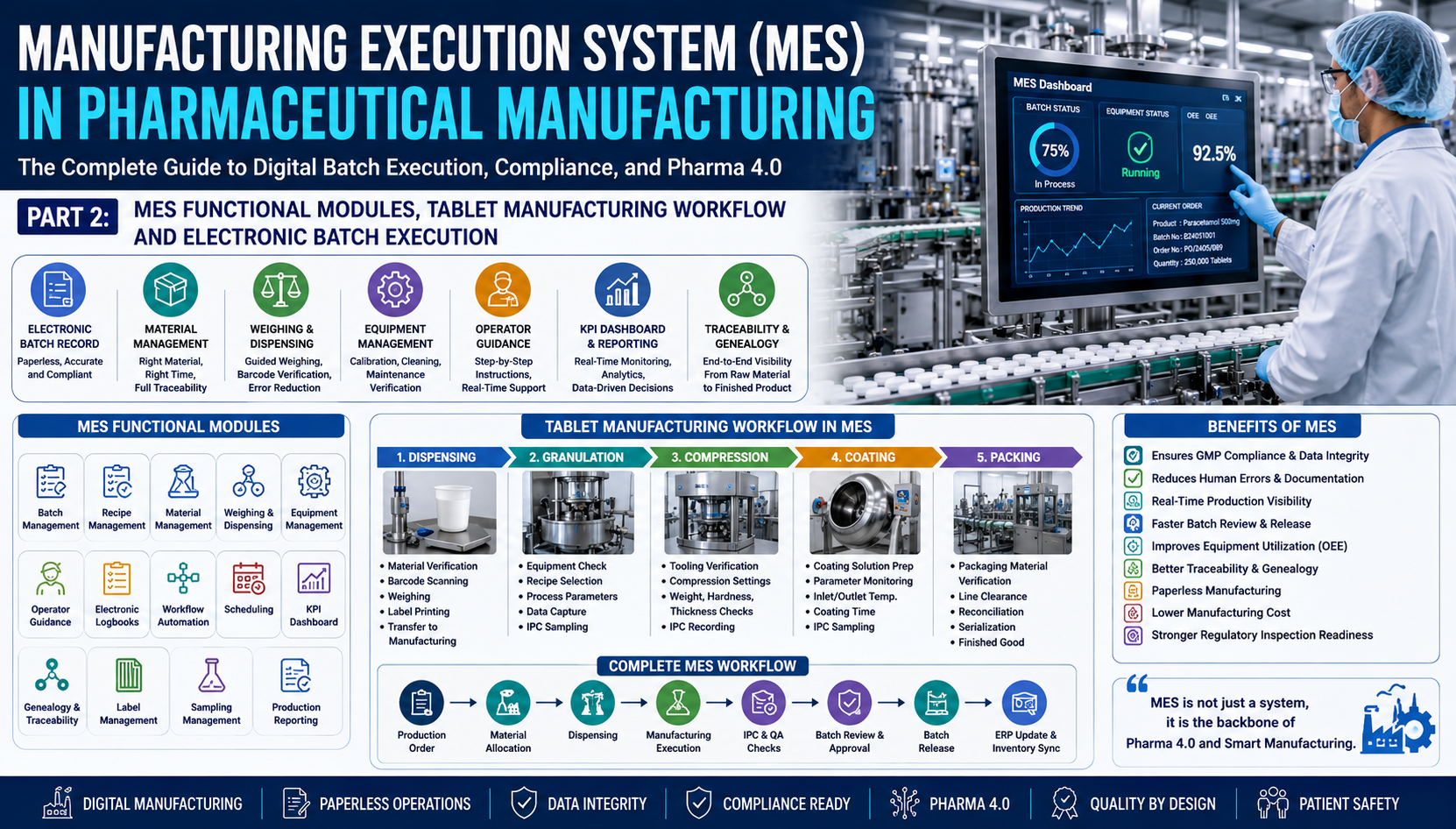
Part 2: MES Functional Modules, Tablet Manufacturing Workflow, and Electronic Batch Execution
Executive Summary
In Part 1, we explored the fundamentals of Manufacturing Execution Systems (MES), the evolution of digital manufacturing, Electronic Batch Records (EBR), and the ISA-95 architecture. In this part, we take a deeper dive into the operational capabilities of MES.
A modern Pharmaceutical MES is much more than an electronic batch record system—it is the digital nerve center that orchestrates materials, equipment, operators, production workflows, quality checks, and real-time decision-making. Every manufacturing activity is electronically guided, verified, documented, and traceable, ensuring compliance with GMP while improving productivity and operational excellence.
Table of Contents
- MES Functional Modules
- Electronic Batch Execution
- MES in Tablet Manufacturing
- Operator Interaction with MES
- Complete MES Workflow
- Electronic Batch Record in Practice
- Benefits of Digital Batch Execution
- Key Takeaways
1. MES Functional Modules
A pharmaceutical MES consists of several integrated modules that work together to execute manufacturing processes digitally.
Overview of MES Modules
| Module | Primary Function |
|---|---|
| Electronic Batch Record (EBR) | Digital batch documentation |
| Batch Management | Execution and monitoring of batches |
| Recipe Management | Control of approved manufacturing recipes |
| Material Management | Material issuance and reconciliation |
| Weighing & Dispensing | Guided dispensing with barcode verification |
| Equipment Management | Equipment status and calibration verification |
| Operator Guidance | Step-by-step electronic work instructions |
| Electronic Logbooks | Digital equipment and area logbooks |
| Workflow Automation | Automated manufacturing workflows |
| Production Scheduling | Shop-floor scheduling and sequencing |
| KPI Dashboard | Real-time production monitoring |
| Genealogy & Traceability | Material and product traceability |
| Label Management | Barcode and label generation |
| Sampling Management | In-process and laboratory sampling |
| Production Reporting | Batch reports and analytics |
2. Electronic Batch Record (EBR)
The Electronic Batch Record replaces the traditional paper Batch Manufacturing Record (BMR).
Functions
- Receives manufacturing order
- Loads approved recipe
- Guides operators
- Records equipment used
- Captures process parameters
- Records IPC observations
- Performs automatic calculations
- Generates audit trail
- Supports electronic signatures
- Creates review-ready batch records
Advantages
✔ Eliminates documentation errors
✔ No illegible handwriting
✔ Automatic calculations
✔ Instant review
✔ Review by Exception
✔ Complete traceability
3. Batch Management Module
Batch Management controls the execution of manufacturing batches according to approved Master Batch Records.
Responsibilities include:
- Batch creation
- Batch status management
- Recipe assignment
- Material verification
- Equipment verification
- Operator authorization
- Manufacturing execution
- Batch completion
- Batch closure
Typical Batch Status:
Created
      ↓
Approved
      ↓
Released
      ↓
In Process
      ↓
Under QA Review
      ↓
Released
      ↓
Closed
4. Recipe Management
Recipe Management ensures only approved manufacturing instructions are executed.
A recipe includes:
- Raw materials
- Quantities
- Equipment
- Manufacturing sequence
- Critical Process Parameters (CPP)
- In-Process Controls (IPC)
- Hold times
- Cleaning requirements
- Sampling plans
Benefits:
- Standardized manufacturing
- Version control
- Change management
- Reduced variability
5. Material Management
MES controls material movement from warehouse to production.
Functions:
- Material request
- Material reservation
- Batch allocation
- Expiry verification
- FEFO/FIFO checks
- Status verification
- Material reconciliation
- Consumption recording
Barcode Verification
Operator scans:
✓ Material
✓ Batch Number
✓ Quantity
✓ Expiry Date
✓ Storage Status
If incorrect material is scanned:
❌ MES blocks manufacturing immediately.
6. Weighing & Dispensing
One of the most valuable MES functions.
Workflow:
Production Order

↓

Material Request

↓

Material Picking

↓

Barcode Verification

↓

Electronic Weighing

↓

Tolerance Check

↓

Electronic Recording

↓

Container Label Printing

↓

Transfer to Manufacturing
Advantages:
- Zero manual calculations
- Accurate dispensing
- Reduced dispensing errors
- Automatic reconciliation
7. Equipment Management
Before production starts, MES verifies:
- Equipment qualification status
- Calibration validity
- Cleaning status
- Preventive maintenance status
- Equipment availability
- Usage history
If equipment is overdue for calibration:
🚫 Production cannot proceed.
8. Operator Guidance
MES provides electronic work instructions.
Example:
Screen 1
Step 1
Verify equipment ID.
↓
Step 2
Scan equipment barcode.
↓
Step 3
Verify cleaning status.
↓
Step 4
Proceed to dispensing.
Every operator action is recorded.
9. Electronic Logbooks
Paper logbooks are replaced by electronic records.
Examples:
- Equipment Logbook
- Cleaning Logbook
- Maintenance Logbook
- Calibration Logbook
- Area Entry Logbook
Benefits:
- Searchable
- Time stamped
- Audit trail enabled
- Electronic signatures
10. Workflow Automation
MES automatically controls manufacturing progression.
Example:
Dispensing Complete

↓

QA Approval

↓

Granulation Starts

↓

IPC Passed

↓

Drying Starts

↓

Compression Starts

↓

Coating Starts

↓

Packing Starts
Manufacturing cannot continue until mandatory activities are completed.
11. Production Scheduling
MES schedules production based on:
- Equipment availability
- Material availability
- Operator availability
- Product priority
- Cleaning schedule
- Maintenance schedule
Benefits:
- Reduced waiting time
- Improved equipment utilization
- Better production planning
12. KPI Dashboard
MES provides real-time dashboards.
Typical KPIs:
| KPI | Purpose |
|---|---|
| OEE | Equipment efficiency |
| Yield | Manufacturing performance |
| Batch Cycle Time | Production speed |
| Downtime | Equipment losses |
| Right First Time | Batch quality |
| Rejection Rate | Process capability |
| Schedule Adherence | Planning efficiency |
| Operator Productivity | Workforce utilization |
13. Genealogy & Traceability
MES maintains complete product genealogy.
Example:
Finished Product

↓

Compression Batch

↓

Granulation Batch

↓

Dispensed Materials

↓

Supplier Batch

↓

Manufacturer
This supports rapid investigations and product recalls.
14. Label Management
MES automatically generates:
- Material Labels
- Container Labels
- Product Labels
- Pallet Labels
- Shipping Labels
Barcode and QR codes improve traceability and reduce labeling errors.
15. Sampling Management
MES guides quality sampling activities.
Examples:
- Raw Material Sampling
- Blend Sampling
- Compression IPC Sampling
- Coating Sampling
- Finished Product Sampling
- Stability Samples
Each sample receives a unique electronic identification.
16. Production Reporting
Automated reports include:
- Batch Report
- Equipment Utilization
- Downtime Analysis
- OEE Report
- Yield Report
- Reconciliation Report
- Production Summary
- Shift Report
Reports are available instantly, eliminating manual compilation.
17. MES in Tablet Manufacturing
Stage 1 – Dispensing
Operator Activities:
- Login to MES
- Receive dispensing order
- Scan material barcode
- Verify material status
- Perform weighing
- Print dispensing labels
- Transfer materials
MES ensures only approved materials are dispensed.
Stage 2 – Granulation
MES verifies:
- Equipment cleaning
- Equipment calibration
- Recipe selection
- Material availability
- Operator authorization
During processing, MES records:
- Mixing time
- Binder addition
- Granulation endpoint
- Temperature
- Torque
- Process alarms
Stage 3 – Compression
MES controls:
- Punch verification
- Tooling verification
- Compression parameters
- Tablet weight
- Thickness
- Hardness
- Disintegration
- Machine speed
Any IPC failure triggers alerts and requires corrective action before continuation.
Stage 4 – Coating
MES records:
- Coating solution preparation
- Spray rate
- Inlet temperature
- Exhaust temperature
- Pan speed
- Product temperature
- Coating duration
Automatic data capture minimizes manual intervention.
Stage 5 – Packaging
MES verifies:
- Packaging material
- Printed components
- Artwork version
- Vision inspection
- Serialization data
- Reconciliation
- Finished goods quantities
Incorrect packaging materials are automatically rejected by the system.
18. Complete MES Workflow
ERP Creates Production Order

↓

MES Receives Order

↓

Recipe Verification

↓

Material Allocation

↓

Warehouse Picking

↓

Dispensing

↓

Granulation

↓

Drying

↓

Compression

↓

Coating

↓

Packing

↓

In-Process Controls

↓

QA Review

↓

Electronic Batch Record Completion

↓

Electronic Approval

↓

ERP Inventory Update

↓

Batch Released
19. Operator Interaction with MES
A typical operator workflow includes:
- Secure login using unique credentials
- Electronic signature verification
- Task assignment
- Barcode scanning of materials and equipment
- Guided execution of each manufacturing step
- Automatic prompts for IPC checks
- Recording observations and comments
- Electronic completion of tasks
- Escalation of deviations when required
This guided approach reduces reliance on memory and helps ensure consistent execution across shifts.
20. Benefits of Digital Batch Execution
| Traditional Process | MES-Enabled Process |
|---|---|
| Manual batch records | Electronic Batch Records |
| Handwritten entries | Automatic data capture |
| Manual calculations | System calculations |
| Delayed reviews | Real-time review |
| Paper logbooks | Electronic logbooks |
| Manual traceability | End-to-end genealogy |
| High documentation effort | Automated documentation |
| Greater risk of errors | Standardized execution |
Organizations implementing MES commonly report improvements such as:
- 30–70% reduction in documentation effort
- Faster batch review and release
- Lower human error rates
- Improved Right First Time (RFT)
- Enhanced audit readiness
- Better production visibility
- Increased Overall Equipment Effectiveness (OEE)
- Stronger data integrity and compliance
Actual results vary depending on process maturity, implementation quality, and organizational readiness.
Key Takeaways
- MES integrates multiple functional modules to digitize and control pharmaceutical manufacturing.
- Electronic Batch Records (EBR) replace paper-based documentation with secure, traceable digital records.
- Modules such as material management, recipe control, equipment verification, operator guidance, and production reporting work together to ensure compliant execution.
- MES supports every stage of tablet manufacturing—from dispensing to packaging—through guided workflows and real-time data capture.
- Digital batch execution improves consistency, reduces manual effort, strengthens traceability, and accelerates quality review and batch release.
Coming in Part 3
The next part of this guide will cover:
- MES Integration with SAP ERP
- SCADA, PLC, and DCS Integration
- LIMS Integration
- QMS and eDMS Integration
- Warehouse Management System (WMS)
- Historian Integration
- Laboratory Instrument Integration
- Barcode & RFID Architecture
- Electronic Batch Record (EBR) Deep Dive
- Integration Architecture Diagrams and Real-World Use Cases
About the Author
Ramesh Palav is a seasoned professional in GxP Quality, Computer System Validation (CSV), Data Integrity, and Pharmaceutical IT Compliance. He has extensive experience in implementing and managing GxP computerized systems, risk-based validation, audit trails, data integrity, and regulatory compliance. Through his articles and professional insights, he aims to share practical knowledge and help pharmaceutical and life-sciences professionals strengthen quality, compliance, and data integrity.